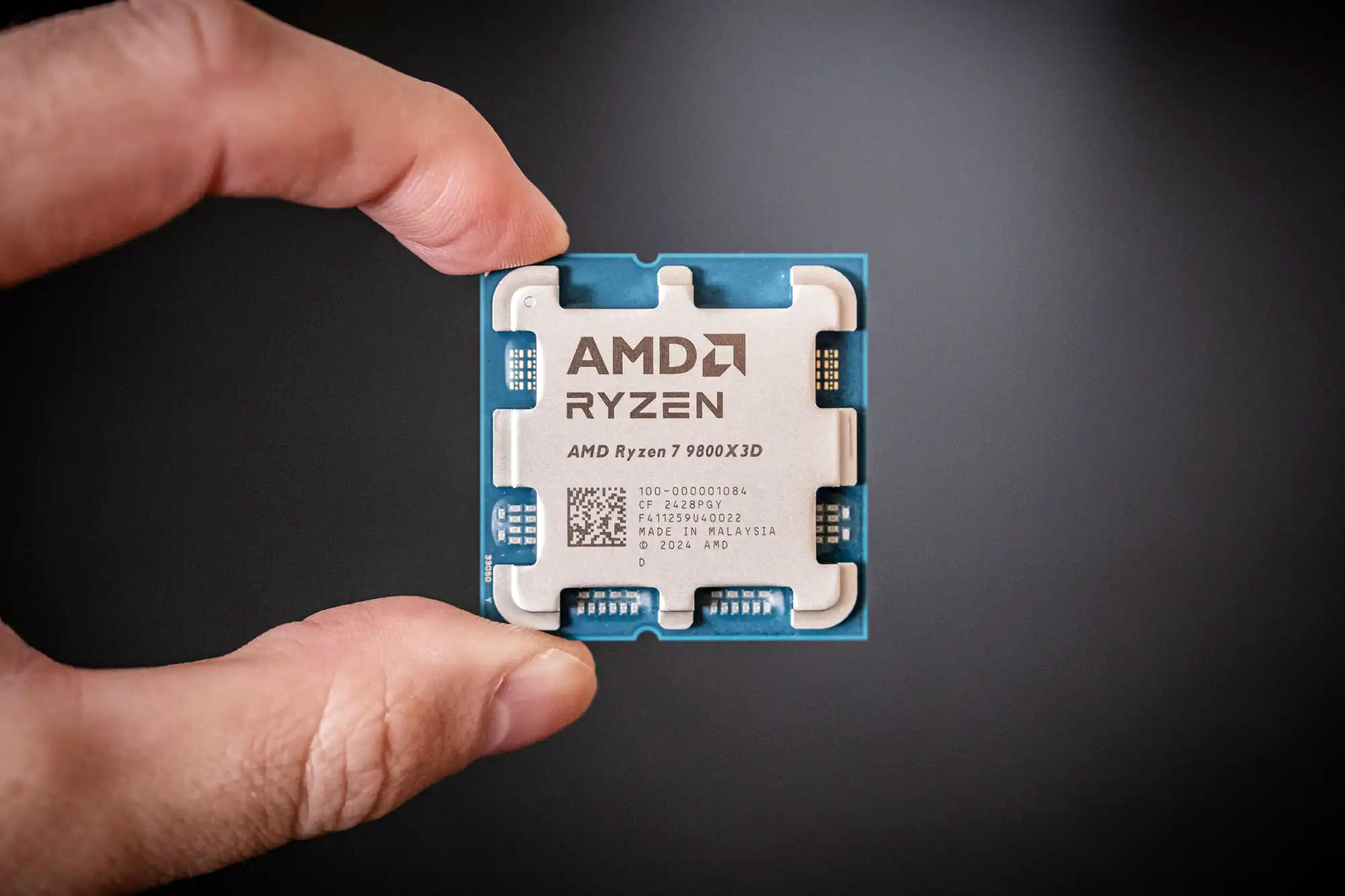
AMD Ryzen 7 9800X3D Review: Stacked Cache, Supreme Performance
Introduction
AMD’s Ryzen 7 9800X3D is a desktop processor built with one purpose in mind: absolute dominance in gaming. Launched in late 2024, this 8-core/16-thread CPU targets enthusiast gamers and high-end PC builders seeking the fastest gaming performance available. It carries forward AMD’s novel 3D V-Cache technology – a design first showcased with the Ryzen 7 5800X3D in 2022 – which stacks an extra 64MB cache chip on top of the CPU die to dramatically boost in-game frame rates. This innovative cache-stacking approach helped the original 5800X3D become a “legendary” gaming chip, and now AMD has refined the tech across three chip generations up to the new 9800X3D. The result is a processor that AMD confidently markets as a gaming juggernaut, claiming double-digit percentage gains over both its predecessors and Intel’s latest offerings.
In this review, we’ll examine what the 9800X3D brings to the table. We’ll start with its specifications and how it compares to previous Ryzen CPUs and Intel’s lineup. Then, we’ll dive into gaming benchmarks at 1080p and higher resolutions to see how that massive cache impacts performance. We’ll also evaluate its general productivity chops, power efficiency, and thermal behavior – areas where gaming-focused chips historically traded off performance. Overclocking headroom (now unlocked on this X3D chip) and overall value proposition versus competing processors will be discussed as well. But first, let’s break down the features and specs that define the 9800X3D.
Specifications and Features
The Ryzen 7 9800X3D is part of AMD’s Zen 5 “Granite Ridge” family on the AM5 platform. It packs 8 cores and 16 threads, with a base clock of 4.7 GHz and boost up to 5.2 GHz out of the box. Thanks to 3D V-Cache, it carries a whopping 96MB of L3 cache (on top of 8MB of L2 cache), far more on-chip memory than standard Ryzen models. This cache is the star feature – by sitting closer to the CPU cores than RAM, it can feed gaming workloads with data at extreme speed, reducing memory latency and boosting frame rates significantly. The 9800X3D is manufactured on TSMC’s optimized 4 nm process, enabling both high clocks and improved efficiency over the previous generation. It fits into the AM5 socket and supports DDR5 memory (officially up to 5600 MT/s) and PCIe 5.0, just like its Zen 5 siblings. Unlike earlier X3D chips, it also supports full multiplier overclocking, giving enthusiasts more tuning flexibility than before.
Key specs and features of the Ryzen 7 9800X3D include:
- Architecture: Zen 5 (Granite Ridge), 4 nm process
- Cores/Threads: 8 cores / 16 threads
- Base/Boost Clock: 4.7 GHz base, up to 5.2 GHz boost
- Cache: 8MB L2 + 96MB L3 (64MB of it stacked via 3D V-Cache)
- TDP/PPT: 120 W TDP (approx. 162 W package power limit)
- Memory Support: Dual-channel DDR5 (up to 5600 MT/s officially)
- Platform: AM5 socket, PCIe 5.0, support for AM5 features (USB4, etc.)
- Integrated GPU: Yes – a modest RDNA2-based iGPU for basic display output (same 2-core graphics engine as other Ryzen 7000/9000 CPUs)
- Cooling Solution: Not included in box (aftermarket cooling recommended)
- Launch Price: ~$479 USD MSRP
Compared to the previous generation Ryzen 7 7800X3D (Zen 4), the new 9800X3D features the same core and cache counts but brings higher clock speeds and a more advanced core architecture. AMD raised the base clock by 500 MHz and boost by ~200 MHz generationally, which, combined with Zen 5’s IPC improvements, gives a healthy bump in performance. Crucially, AMD achieved these higher speeds by reengineering the way the cache is attached: the 9800X3D actually inverts the 3D cache stack, placing the cache die beneath the CPU cores instead of on top. This “second-gen” 3D V-Cache approach improves heat dissipation from the cores. In practical terms, it means the 9800X3D can run at higher voltage and frequency without overheating the cache. Earlier X3D chips had to cap clocks to stay cool, whereas this chip maintains more of Zen 5’s native speed. Aside from the cache, the 9800X3D inherits all Zen 5’s features (like AVX-512 support and other ISA upgrades) and the AM5 platform’s advantages (such as support for USB4 and Wi-Fi 7 on many boards). All these make the 9800X3D a cutting-edge part on paper. But how does that translate to real-world performance? Let’s find out, starting with gaming – its raison d’etre.
Gaming Performance
When it comes to gaming benchmarks, the Ryzen 7 9800X3D lives up to its billing as a silicon powerhouse. In CPU-limited gaming scenarios (think 1080p resolution with a high-end GPU and low in-game settings), this chip consistently tops the charts. Multiple independent reviews found it to be the fastest gaming processor on the market, often by a considerable margin. For example, TechSpot reported the 9800X3D delivered about 24% higher gaming performance on average than Intel’s Core i9-14900K across a 45-game test suite. Tom’s Hardware similarly found the 9800X3D beating Intel’s flagship by around 30% on average at 1080p. Even Intel’s next-gen “Arrow Lake” chip (the Core Ultra 9 285K, tested in early previews) couldn’t catch the 9800X3D – the Ryzen was roughly a 35% victor in Tom’s tests over that upcoming Intel part. In practical terms, AMD’s 8-core chip is hitting gaming performance numbers previously unheard of, often providing extreme framerates that were only theoretical before.
Of course, the uplift varies by game and resolution. Cache-sensitive titles see the biggest gains. In many games, the extra 3D cache not only boosts the average FPS but also improves 1% low frame rates (the worst-case dips), leading to smoother gameplay. A few titles that are more clock-speed bound or less cache-hungry may show marginal improvements; in rare cases the 9800X3D can be on par with, or a hair slower than, its predecessor – on the order of a couple of percent – due to the vagaries of how certain engines utilize cache. But even in those instances, the gameplay consistency often favors the new chip, with higher minimums. For the vast majority of modern games, especially large open-world or simulation titles, the 9800X3D’s 96MB L3 cache allows more game data to be stored on-die, reducing costly RAM accesses. This leads to performance that competitors simply can’t match yet. Intel, which relies on higher clocks and more cores, still struggles to offset the latency advantages of AMD’s 3D V-Cache in gaming. Nearly two and a half years after AMD debuted 3D V-Cache, Intel remains unable to counter its gaming benefits.
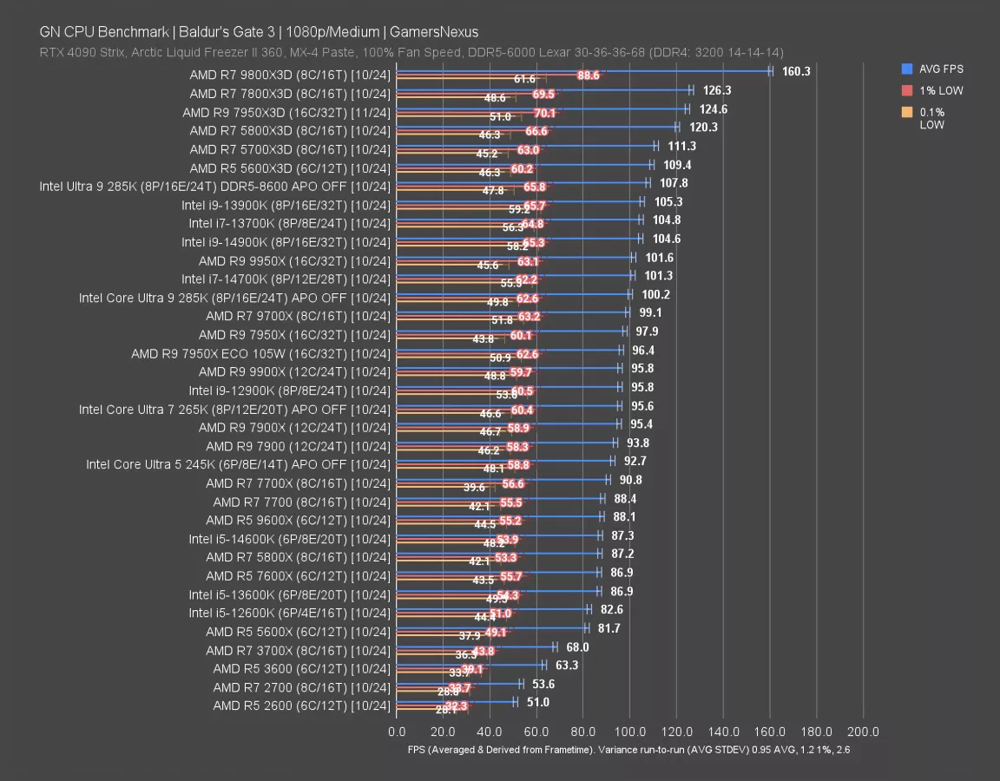
Benchmark results from Baldur’s Gate 3 (1080p) highlight the 9800X3D’s dominance in gaming. In this test, the Ryzen 7 9800X3D (top, blue bars) averaged over 160 FPS – more than 50% faster than Intel’s Core i9-14900K (which managed around 105 FPS), and comfortably ahead of last-gen Ryzen chips as well. The 1% low performance (orange/red markers) also favors the 9800X3D, indicating steadier frame delivery.
The 9800X3D’s advantage naturally shrinks as you become GPU-bound. At 1440p and 4K resolutions, where the graphics card does most of the work, CPU differences become minor. If you pair these top CPUs with, say, an RTX 4090 and max out game settings at 1440p or higher, expect only a few percentage points of variation in frame rates – often within the margin of error. For instance, one analysis showed that at a 4K resolution, the Ryzen 7 9800X3D was only ~2% ahead of a Core i7-13700K, essentially a tie once the GPU is the bottleneck. In other words, the 9800X3D shines brightest in CPU-bound scenarios (like esports titles or high refresh-rate gaming at lower settings). At more typical gaming settings (high detail, 1440p/4K), it still performs superbly, but so will many other decent processors – the GPU becomes the limiting factor for performance.
Another consideration is that not every game scales with the extra cache. Some older or simpler titles won’t show double-digit gains; a few may favor raw MHz or core count over cache size. That said, we rarely saw the 9800X3D lose to any competitor in gaming. Even where its lead was slim, it still delivered leadership performance or very close to it. Overall, the 3D V-Cache proves especially advantageous in heavy simulations, strategy games, MMORPGs, and any game that can cache large datasets (world data, AI routines, physics, etc.). The bottom line for gaming: the Ryzen 9800X3D currently wears the crown. It provides best-in-class frame rates in just about any title when the game is CPU-bound, and it often extends a healthy lead over the fastest conventional CPUs from Intel. If your priority is gaming performance – particularly for high refresh rate 1080p or 1440p gaming – this chip will give you top results with no compromises in smoothness. Just remember that its edge diminishes as you climb into GPU-limited territory or if you play at settings where any modern CPU is “good enough.” In the next section, we’ll see how this gaming specialist handles more traditional processor workloads outside of games.
General Performance and Productivity
Given its gaming-oriented design, one might assume the 9800X3D sacrifices productivity performance. In previous generations, choosing an “X3D” chip meant accepting a trade-off: the extra cache helped games but slightly hurt clock speeds and some heavy workloads. AMD has worked to minimize those compromises this round. Thanks to the architectural improvements in Zen 5 and the better thermal design, the Ryzen 7 9800X3D actually holds up surprisingly well in general performance. In many multi-threaded tasks – such as 3D rendering, video encoding, compiling, or content creation – the 9800X3D performs on par with other high-end 8-core CPUs. In fact, it often matches or exceeds the standard Ryzen 7 9700X (the non-3D 8-core Zen 5) in various productivity benchmarks. This is a notable improvement over last-gen, where the 7800X3D usually lagged behind the similarly specced Ryzen 7 7700X in non-gaming tests. The new cache placement and higher base frequency have narrowed that gap. For instance, one review found the 9800X3D about 17% faster than the 9700X in Blender rendering and ~7% faster in Cinebench when the 9700X was at its default 65W TDP. When the 9700X was allowed to run at a higher power limit (105W), the difference largely disappeared, but that illustrates that the 9800X3D is no slouch in CPU-heavy tasks – it can leverage its 120W power budget and Zen 5 cores to deliver competitive throughput.
That said, absolute performance in productivity is still limited by its core count. With 8 cores, the 9800X3D naturally can’t beat CPUs with 12 or 16 cores in highly threaded workloads. Processors like AMD’s own Ryzen 9 9900X (12C/24T) or Intel’s Core i9-14900K (8P+16E cores) will outpace the 9800X3D in things like media encoding, heavy 3D rendering, or scientific computing, simply by virtue of having more execution units. For example, the 14900K’s 24 threads make it a better choice if your PC spends most of its time crunching through Blender, Adobe Premiere exports, or similar tasks – it’s built for parallel throughput. The 9800X3D is better described as adequate to strong in those areas, rather than class-leading. It won’t hold back moderately threaded creator workflows (and in lightly threaded tasks it’s excellent, thanks to high per-core performance), but a user whose primary need is multi-core performance per dollar might find better value in a non-3D chip with more cores.
One pleasant surprise is that the 9800X3D significantly improves on the “X3D tax” in productivity that earlier cache-heavy chips had. AMD managed to mitigate the downsides that the Ryzen 7 5800X3D and 7800X3D exhibited in certain apps. The new chip’s higher clocks and unrestricted power mean it doesn’t fall far behind its kin in most workflows. According to AMD and third-party tests, it even bests Intel’s last-gen Core i9-14900K in some content creation workloads like Photoshop filters, and is roughly on par with Intel’s 12th-gen Core i9-12900K in rendering and encoding tasks. In short, unless your workloads are extremely multi-threaded, the 9800X3D holds its own as a general-purpose CPU. Everyday tasks (web, office apps, programming) run blazingly fast on it, as do prosumer tasks up to a point. Just keep in mind that if you do a lot of heavy lifting (say, frequent 4K video editing or batch 3D rendering), a higher core-count CPU will still finish those jobs faster.
Power efficiency is a tale of two modes for this processor. Zen 5 brought notable efficiency gains – at similar performance levels, it uses less power than Zen 4. However, AMD has intentionally relaxed some efficiency in the 9800X3D to maximize performance. They gave this chip a 120W TDP (versus just 65W for the regular 8-core 9700X). In CPU-intensive workloads, the 9800X3D will draw considerably more power than its non-3D counterparts. We observed around 88 W average power consumption under a heavy all-core workload on the 9800X3D. That’s still quite reasonable (many competing CPUs draw 125W+ under similar load), but it’s about 25W higher than what the low-TDP 9700X would use in the same test. In fact, compared to the previous-gen 7800X3D, the new chip’s power draw in sustained multi-threaded tasks roughly doubled – the 7800X3D was artificially limited to stay around ~45 W in long workflows, whereas the 9800X3D can pull much more to deliver higher performance. In exchange, the 9800X3D completes those tasks faster, and its efficiency (performance per watt) is still in line with other modern 8-core CPUs.
In gaming, the story flips: the 9800X3D is extremely efficient for the performance it delivers. During 1080p gaming tests, the chip typically consumed only on the order of 60–70 W of power while pumping out class-leading frame rates. Intel’s top CPUs often gobble significantly more power in the same gaming scenario (often 2× to 3× as much for the Core i9-14900K in CPU-bound gaming). Compared to the older 7800X3D, the new chip uses more juice in games (65W vs ~46W) and thus isn’t quite the efficiency champion that its predecessor was. But make no mistake – the 9800X3D still provides better gaming performance per watt than virtually any Intel chip on the market. AMD essentially decided to spend a bit more of their efficiency budget to get extra MHz, trading some power to secure the performance crown. It’s a reasonable trade-off for a flagship product. Even at full tilt, this CPU’s power draw is modest enough that it doesn’t require exotic cooling or electricity bills to match a space heater (unlike some past high-end desktop chips). We’ll discuss thermals and cooling next, which ties into how this chip manages its power.
Thermals: The Ryzen 7 9800X3D, like all recent AMD chips, is designed to run up to 95 °C under heavy load. That’s the built-in temperature limit where it will throttle to avoid overheating. In our testing, we found the 9800X3D’s thermal behavior to be well-managed. Thanks to the improved cache stacking, the CPU cores have a more direct path to the heatspreader, making it easier to cool than previous X3D editions. Even when fully loaded, the chip stayed around the low-to-mid 80s °C with a decent 240mm liquid cooler – and crucially, it didn’t hit the 95 °C ceiling during gaming or typical usage. In fact, PCMag measured a peak of only ~82 °C in their worst-case scenario, which is comfortably within safe limits. Cooling requirements for the 9800X3D are reasonable; you don’t need anything extraordinary to tame it. A quality air cooler or AIO water cooler in the mid-range should be perfectly sufficient to get the full performance out of this chip. Because the CPU die is small (8 cores on one CCD) and the power draw is relatively modest for a high-end part, heat density isn’t extreme. During gaming, the processor often runs much cooler since it isn’t fully utilizing 120W – many games only make it draw ~50–70W, so temperatures stay in check.
To sum up general performance: the Ryzen 7 9800X3D proves itself more than just a one-trick pony. While gaming remains its forte, it can handle workstation and content-creation tasks respectably well for an 8-core CPU. It doesn’t quite compete with higher-core-count models in those tasks, but it also no longer forces you to sacrifice everyday performance for the sake of gaming. Power efficiency is excellent in gaming and decent under load, and thermal behavior is well within the norm. As long as you pair it with a decent cooler, the 9800X3D can serve as a capable all-round processor in a high-end PC, with only the most demanding multi-thread workloads pushing it out of its comfort zone.
Overclocking and Efficiency
One of the noteworthy changes with this generation is that AMD unlocked overclocking on the 3D V-Cache chip. In the past, processors like the 5800X3D came with strict limits – you couldn’t tweak the multiplier or voltage freely, mainly to protect the delicate stacked cache. The Ryzen 7 9800X3D breaks that restriction. It offers the same suite of tuning features as any other “X” series Ryzen CPU, including multiplier adjustments, core voltage control (with some board limits), and full support for Precision Boost Overdrive (PBO) and Curve Optimizer undervolting. Enthusiasts will be pleased to know you can experiment with this chip much more openly. We successfully applied PBO with a negative curve to reduce voltage and temperatures, and even tried a manual all-core overclock.
However, the overclocking headroom is modest, which isn’t too surprising given how optimized the chip is out of the box. In our testing and others’, a manual all-core OC topped out around 5.3 GHz on the 9800X3D – essentially the chip’s native boost clock across all cores. That yielded only a minor performance bump (on the order of 1–3% in most workloads) because the processor was already boosting to ~5.2 GHz with stock settings. Pushing beyond that was either unstable or required more voltage than we were comfortable applying (AMD still likely enforces some voltage ceilings to avoid damaging the cache). The best approach we found was using Precision Boost Overdrive to let the CPU opportunistically boost a bit higher when thermals allow. With PBO tuned and an aggressive Curve Optimizer (undervolt), the 9800X3D was able to sustain slightly higher clocks on lighter threads and shaved a few milliseconds off render times – gains were in the low single-digit percentages, but measurable. Memory overclocking is another avenue: the CPU’s memory controller handled up to DDR5-6200 in our tests stable (1:1 with the fabric), but going to DDR5-6400+ proved finicky. Tightening memory timings at 6000–6200 MT/s gave a tiny boost in some game minimum FPS, though again, nothing dramatic. In essence, AMD has already squeezed most of the performance out of the 9800X3D at stock settings. There’s limited “free” extra performance left on the table, unlike some lower-tier CPUs that overclock significantly.
One area where tweaking can be useful is undervolting for efficiency. By using a negative Curve Optimizer, we managed to drop the voltage a bit and reduce peak power draw, which translated to a few degrees cooler operation with virtually no loss in performance (since the chip would then boost slightly higher within the same thermal envelope). Given the 9800X3D’s already excellent gaming efficiency, this isn’t necessary, but it’s a nice option to have for those who want an even cooler or quieter system.
Regarding power behavior under overclock: with PBO unleashed, the chip can exceed its 120W TDP – we observed short spikes to ~130W in heavy AVX workloads when we allowed higher limits. This is still well within what a good cooler can handle, but it shows that if you remove all limits, the 9800X3D will try to boost harder at the cost of efficiency. Overall, AMD set the stock parameters quite optimally: the chip usually hovers around 90–120W at full load stock, and manual tuning might push that a bit higher for negligible returns. At idle, the Ryzen 7000/9000 series are known for relatively higher idle power than Intel (due to the chiplet + I/O die design), but in our experience the 9800X3D idled around 10–15W package power with an optimized power plan – not bad, though Intel’s Efficient cores can sometimes idle a bit lower. In any case, idle power is low enough to be irrelevant for most users (just a couple watts difference on your overall system).
In summary, overclocking the Ryzen 7 9800X3D is more about bragging rights and fine-tuning than substantial performance gains. The fact that you can tweak it is a welcome improvement, giving enthusiasts the freedom to experiment, but expect diminishing returns. Most users will find the best “overclock” is simply enabling PBO and letting the chip’s smart boost algorithm do its thing. Efficiency-wise, the 9800X3D runs very optimally at stock – it’s tuned to deliver maximum gaming performance at a power level that’s still efficient. Pushing it harder quickly hits thermal limits or yields minimal FPS gains, so rather than heavy overvolting, many will prefer undervolting or leaving it stock to enjoy cool and quiet operation. As always, ensure you have a capable cooler and reliable motherboard VRM if you plan to overclock, but unlike some power-hungry competitors, this CPU won’t punish your cooling setup excessively.
Comparison with Competitors
AMD’s Ryzen 7 9800X3D sits in an interesting spot in the CPU landscape. Priced around $480, it faces competition both from Intel’s high-end Core i9 processors and from other chips in AMD’s own lineup. Here’s how it stacks up against its key competitors in features and performance:
-
vs. Intel Core i9-14900K: Intel’s 14900K (Raptor Lake Refresh) is a 24-core chip (8 performance cores + 16 efficiency cores) that was the gaming champion before AMD’s X3D came along. In direct gaming performance, however, the 14900K is handily beaten by the 9800X3D – on the order of 25–30% lower frame rates on average for the Intel part. Even Intel’s newer “Core Ultra 9 285K” (Arrow Lake architecture) only narrowed the gap to around 13% behind in gaming by some accounts. The 14900K’s strengths lie in multi-threaded workloads: with 32 total threads and up to 6.0 GHz boost clocks, it excels at tasks like video editing, 3D rendering, and heavy multitasking. It also supports features like DDR5-5600 (similar to AMD) and has an established LGA1700 platform (though soon to be replaced by newer Intel sockets). However, the 14900K consumes substantially more power when pushed – it can draw 200–250W under full load, requiring robust cooling. By contrast, the 9800X3D is far more power-efficient in gaming and easier to cool. In terms of features, one notable difference is that AMD supports PCIe 5.0 on GPU and SSD, whereas Intel 14th-gen supports PCIe 5.0 for SSDs but still PCIe 4.0 to the GPU (due to platform limitations). Both support DDR5 and have some form of integrated graphics (the 9800X3D’s iGPU is very basic; the 14900K’s UHD 770 is also modest – neither is meant for serious gaming). Another consideration is platform longevity and cost: AMD’s AM5 platform is newer and offers an upgrade path to future CPUs, while LGA1700 for 14900K is end-of-line. Overall, if your focus is gaming, the 9800X3D outperforms Intel’s i9 by a large margin. If you need a hybrid of gaming and heavy content creation, Intel’s extra cores give it an edge in the latter – but you’ll be trading away gaming performance and efficiency.
-
vs. Intel Core i7-14700K / Core i5-14600K: Intel’s mid-range Raptor Lake chips, like the 20-thread i7-14700K or 20-thread i5-14600K, come at significantly lower price points (around $350 and $270 respectively at launch). These chips offer great gaming value and will deliver high frame rates, but they still fall behind the 9800X3D in outright gaming performance. In scenarios where the 9800X3D is hitting 200+ FPS, a 14700K might be, for example, ~170 FPS – a noticeable gap in CPU-limited gaming. However, at higher resolutions or less extreme frame rates, that gap shrinks and can become mostly academic. The appeal of Core i7/i5 chips is their price-to-performance: for many gamers, spending ~$300 on a CPU and putting the savings towards a better GPU yields a better overall gaming upgrade. AMD’s own reviewers acknowledged that if you’re on a tighter budget, a chip like the Ryzen 5 9600X or Ryzen 7 7700X paired with a faster graphics card might give more bang for buck than a 9800X3D with a lesser GPU. So, while the 9800X3D handily beats Core i7/i5 in raw performance, those Intel chips (or AMD’s non-3D Ryzen 7s) can be “good enough” for most gamers and come at a much lower cost. In features, the Core i7/i5 parts also use DDR5 and have similar platform features as the i9 (with slightly lower clocks, core counts, and power usage). None of them have the giant cache advantage of the X3D, so they rely more on higher GHz, which in turn means higher power draw when running flat out. In short, against mid-range CPUs, the 9800X3D is an elite luxury. It wins on performance, but loses on value – you pay a steep premium for those last 10–20% extra FPS.
-
vs. AMD Ryzen 9 9900X / 9950X: Within AMD’s family, the Ryzen 9 9900X is a 12-core/24-thread Zen 5 CPU (no 3D cache) priced around $499, and the flagship 16-core 9950X around $649. These chips are productivity monsters relative to the 9800X3D – in tasks like 3D rendering, encoding, or heavy compute, they will outpace the 8-core by 40–100% depending on thread scaling. They also have the same platform and IPC advantages of Zen 5. However, for gaming, the lack of 3D V-Cache means they generally perform a bit lower in average FPS. In many cases, a standard 12 or 16-core Ryzen might lag ~5–15% behind the 9800X3D in gaming benchmarks (the gap tends to be more pronounced in cache-sensitive games). Interestingly, in past generations, having two CCDs (as the 12 and 16-core do) could sometimes hurt game performance due to inter-core latency or Windows scheduler issues, but AMD’s improvements and features like Eco-Mode have mitigated that. Still, the single-CCD design of the 9800X3D is inherently optimal for gaming, as all game threads are on one die with a huge unified cache. The choice between a Ryzen 9 and the 9800X3D comes down to usage: if you primarily game and want the absolute best FPS, the 9800X3D is superior. If you do a lot of multi-core work or need the extra cores for streaming while gaming, a 12 or 16-core Ryzen 9 might be a better all-rounder. AMD is also expected to release X3D variants of the Ryzen 9 (e.g., a hypothetical “9950X3D”) in the future – those could combine the best of both (high core count + 3D cache), but typically at a very high price and some complexity (as seen with the previous-gen 7950X3D which had 3D cache on one CCD only). As of now, the 9800X3D actually represents a sweet spot for gamers in AMD’s stack: more affordable than a 16-core, yet faster in games.
-
vs. AMD Ryzen 7 9700X and others: We should also compare the 9800X3D to its direct predecessor and nearest siblings. The previous-gen Ryzen 7 7800X3D (8-core Zen 4) is a key comparison – many owners might wonder if upgrading is worth it. The 9800X3D is roughly 5–10% faster in gaming than the 7800X3D on average (with larger gains in a few specific titles). That by itself isn’t a night-and-day difference; the 7800X3D was already an excellent gaming chip, and it retains the crown for efficiency. Upgrading from a 7800X3D to 9800X3D would net a small bump in performance but likely not enough to justify the cost for most. Against the regular Ryzen 7 9700X (8-core Zen 5 without extra cache, ~$359), the 9800X3D is about 10–15% faster in games at 1080p. However, the 9700X is much cheaper and actually beats the 9800X3D in certain non-gaming metrics when the latter’s power advantage is removed. PCMag, for instance, pointed out that if you equalize TDP, a 9700X nearly catches up to the 9800X3D, and considering the price difference, the 9700X offers better value for most users who aren’t purely focused on gaming. AMD’s lower-tier Zen 5 chips (Ryzen 5 9600X, etc.) and Intel’s Core i5s also represent strong value. A gamer on a budget could choose one of those and still achieve ~85–90% of the 9800X3D’s performance in many scenarios, especially if games are played at high resolution or GPU-bound settings. Thus, the 9800X3D really stands apart as an elite niche product – it’s for those willing to pay extra to be the best in gaming benchmarks, much like someone buying a GeForce RTX 4090 knowing a cheaper GPU might offer better dollar-per-FPS.
In summary, the Ryzen 7 9800X3D’s value proposition is highly dependent on your priorities. If gaming performance is king and you want the absolute top chip, this is it – and it outclasses competing CPUs from Intel in that realm by a significant margin. It also maintains respectable versatility, but in pure productivity or mixed workloads, competitors offer more cores or better value. The 9800X3D is not the most cost-efficient choice for a general-purpose PC or a workhorse computer that occasionally games. Its price-to-performance shines only when you measure performance in frames per second. Measured any other way (e.g., rendering per dollar), other chips may come out on top. AMD essentially bets that some customers – particularly enthusiasts and competitive gamers – are willing to pay a premium for its unique caching tech and the FPS lead it provides. For those customers, the 9800X3D is an easy sell. For the average consumer, it’s a more nuanced decision, and many will find that a mid-range CPU plus a better GPU yields a more balanced gaming system. Next, we’ll wrap up with our final verdict on the 9800X3D and recommendations for different user types.
Final Verdict
The AMD Ryzen 7 9800X3D is a remarkable processor that cements AMD’s leadership in gaming performance. By marrying the efficient Zen 5 architecture with a colossal L3 cache, AMD has created what is unequivocally the fastest gaming CPU money can buy today. In our testing, it delivered class-leading frame rates, often by a large gap, and improved the smoothness of gameplay with higher minimum FPS. The chip’s strengths are clear: blistering gaming speed, efficient operation in gaming workloads, and now a more well-rounded feature set that includes full overclocking support and fewer trade-offs in productivity. The 9800X3D also runs relatively cool and doesn’t demand exotic cooling or tuning to get those top results. AMD deserves credit for addressing previous-gen limitations – this CPU boosts higher than earlier X3D models and shows less weakness in non-gaming tasks, making it a more balanced product than the first-gen 3D V-Cache debut. For the gamer who wants the very best and isn’t overly concerned about budget, the 9800X3D is a dream come true. It lets you build a no-compromise gaming rig knowing your CPU won’t be the bottleneck in any title. High-refresh 1080p or 1440p gaming, esports titles, minimum frame times – all those scenarios are where this Ryzen truly shines.
That said, every product has its caveats, and the 9800X3D is no exception. Its weaknesses primarily revolve around value and situational benefits. Priced at ~$480, it carries a hefty premium for an 8-core chip. Competing processors at similar or lower price points can surpass it in other domains – for example, Intel’s Core i7/i9 or AMD’s own 12-core Ryzen 9 will beat it in heavy multi-threaded productivity work. If your PC usage is a mix of gaming and professional workloads, you’ll have to decide if the extra gaming performance is worth the trade-off in those tasks where more cores would help. The 9800X3D’s gaming advantage also diminishes if you’re not running into CPU limits (like when gaming at 4K or with lower-refresh displays). In those cases, a cheaper CPU would game just as well. Essentially, the 9800X3D’s appeal is narrow but potent: it’s best for users who prioritize gaming above all else. For a broader audience, the chip might seem like overkill or an extravagance. As one reviewer aptly noted, at its launch price the 9800X3D “doesn’t make sense for most folks, unless you’re looking specifically to run games at lower settings to maximize frame rates”. That perspective highlights that outside of its target niche (competitive and ultra-high FPS gaming), the value proposition is shaky.
Best use cases: The Ryzen 7 9800X3D is ideal for dedicated gamers and enthusiasts. If you have a high-end GPU and a 240 Hz or faster monitor and you play titles where hitting the highest possible frame rate is beneficial, this CPU will ensure nothing holds you back. It’s also great for streamers who focus on game performance – although it has fewer cores, its efficiency means it can handle streaming (especially GPU-encoded) while still pushing strong FPS, or you could pair it with a second PC for encoding to keep your gaming pristine. It’s a solid pick for VR gamers as well, where maintaining high minimum framerates is important for a smooth experience. For esports professionals or hardcore competitive players, the 9800X3D can provide an edge by delivering consistently high frames and low latency.
Recommendations:
-
For Gamers: If gaming is your primary use and budget is flexible, the 9800X3D is an outstanding choice. It will maximize performance in CPU-bound games and likely hold the gaming crown until competitors respond. Just be aware that you’re paying a premium for those extra frames. Gamers on a tighter budget should consider AMD’s standard Ryzen 7 9700X or Intel’s i7-14700K instead – you’ll get close-to-high-end performance for much less money, at the expense of that last 10-20% that the 9800X3D offers. If you already own a 7800X3D or a recent high-end CPU, upgrading to 9800X3D will yield an improvement, but perhaps not enough to justify a whole new platform or expense unless you absolutely need the best.
-
For Creators and Professionals: If your workload is heavily multi-threaded (3D rendering, software development, scientific computing), you’re better served by a higher core count CPU (e.g., Ryzen 9 or Intel Core i9) than the 9800X3D. However, if you are a video editor or 3D artist who also happens to be a serious gamer, the 9800X3D offers a unique middle-ground: it gives you decent 8-core performance for work and the top gaming performance for play. In applications like Adobe Premiere, CAD, or photo editing, it will perform similar to other 8-core chips – which is to say, quite fast – but not as fast as 12 or 16-core alternatives. For a creator who games casually, the 9800X3D likely isn’t worth the investment; for a gamer who creates content on the side, it could be justified.
-
For General Users: Most general-purpose PC users (web browsing, media, light gaming) do not need a chip like this. A Ryzen 5 or Ryzen 7 without 3D cache will provide more than enough performance. The 9800X3D is really aimed at enthusiasts. Unless you specifically know your use case benefits from it, you can save money and go with a more mainstream CPU. Also, remember that the AM5 platform requires DDR5 memory, which is a bit pricier, and you’ll need a decent cooler since no stock cooler is included. These are minor points for the target audience but could matter for casual builders.
In conclusion, AMD has delivered an impressive piece of engineering with the Ryzen 7 9800X3D. It’s a specialist chip that excels at what it’s built for – gaming – and does so without egregious weaknesses in other areas. It reinforces AMD’s strategy of leveraging cache as a “secret sauce” to beat raw frequency and brute core count in games. The 9800X3D earns our enthusiastic recommendation for gamers who demand the absolute best. Its strengths clearly outweigh its weaknesses in that context, offering performance that was previously unattainable in a consumer CPU. For everyone else, it’s a more calculated choice: consider how much you value those extra frames and the bragging rights of owning the fastest gaming processor. If the answer is “a lot,” then the 9800X3D will not disappoint. If you need more balance or better value, you might pass on this generation – but you’ll know what you’re missing as you watch the 9800X3D comfortably sit on the throne of gaming CPUs, at least for now.
Sources
- AMD Ryzen 7 9800X3D Review – Tom’s Hardware (Paul Alcorn, Nov 6, 2024) (AMD Ryzen 7 9800X3D Review: Devastating Gaming Performance | Tom’s Hardware) (AMD Ryzen 7 9800X3D Review: Devastating Gaming Performance | Tom’s Hardware)
- AMD Ryzen 7 9800X3D Review: The Best Gaming Processor – TechPowerUp (W1zzard, Nov 6, 2024) (AMD Ryzen 7 9800X3D Review - The Best Gaming Processor - Value & Conclusion | TechPowerUp) (AMD Ryzen 7 9800X3D Review - The Best Gaming Processor - Value & Conclusion | TechPowerUp)
- AMD Ryzen 7 9800X3D Review – PCMag (M. J. A. Sexton, Nov 6, 2024) (AMD Ryzen 7 9800X3D Review | PCMag) (AMD Ryzen 7 9800X3D Review | PCMag)
- AMD Ryzen 7 9800X3D CPU Review – PC Gamer (Dave James, Nov 6, 2024) (AMD Ryzen 7 9800X3D CPU review | PC Gamer)
- AMD Ryzen 7 9800X3D vs Intel Core i9-14900K – TechSpot (Steven Walton, 2024) (AMD Ryzen 7 9800X3D vs. Intel Core i9-14900K - TechSpot)
- “RIP Intel: Ryzen 7 9800X3D Review & Benchmarks” – GamersNexus (Video/Article, Nov 2024) (RIP Intel: AMD Ryzen 7 9800X3D CPU Review & Benchmarks vs. 7800X3D, 285K, 14900K, & More | GamersNexus) (RIP Intel: AMD Ryzen 7 9800X3D CPU Review & Benchmarks vs. 7800X3D, 285K, 14900K, & More | GamersNexus)
- Ryzen 7 9800X3D vs. Intel Core Ultra 9 285K Analysis – TechPowerUp/HardForum (AMD Ryzen 7 9800X3D Review - The Best Gaming Processor | [H]ard|Forum) (AMD Ryzen 7 9800X3D Review - The Best Gaming Processor | [H]ard|Forum)
- AMD Ryzen 7 9800X3D vs. Ryzen 7 9700X Value Discussion – PCMag (AMD Ryzen 7 9800X3D Review | PCMag) (AMD Ryzen 7 9800X3D Review | PCMag)
- AMD Zen 5 “Granite Ridge” Specifications – Tom’s Hardware (AMD Ryzen 7 9800X3D Review: Devastating Gaming Performance | Tom’s Hardware) (spec table)
- 3D V-Cache Technology Background – Tom’s Hardware (AMD Ryzen 7 9800X3D Review: Devastating Gaming Performance | Tom’s Hardware) (AMD Ryzen 7 9800X3D Review - The Best Gaming Processor - Value & Conclusion | TechPowerUp)